Control LINX with the New App
Take full control of your ElectraStim LINX stimulator directly from your smartphone using our new app. Adjust the intensity and control your stimulation using various modes with intuitive on-screen controls.


Orders shipped outside the UK may be subject to customs duties, import taxes, or local fees upon delivery. These charges are set by your local customs authority and are the responsibility of the customer.
The price shown at checkout does not include these potential charges.
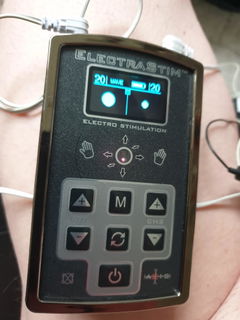
Experience next-level electrostimulation with the ElectraStim Linx EM220. A premium dual-output stimulator with full smartphone control. Use Linx as a stand‑alone stimulator with 23 built‑in patterns, or connect it to the free ElectraStim Linx App to unlock extra play modes like Flick, Tilt, Stereo Stim, and custom Playlists. Whether you’re playing solo or connecting remotely with a partner, Linx gives you premium electrostimulation at your fingertips.
99 Intensity levels per channel - High levels of stimulation designed for experienced users seeking deep, intense stimulation with premium electro accessories.
9 Play Modes - Explore patterns, Flick, Tilt, Stereo Stim, Playlists and more on the Linx Mobile App.
23 Dynamic Patterns - From gentle waves to escalating pulses, Linx gives you lots of ways to pleasure yourself with electrostimulation. Check out the top tip below for more patterns.
NEW App Controlled - Take full control of your Linx Stimulator using the free ElectraStim Linx App via a Bluetooth connection. Gain access to extra play modes when connecting to the app.
NEW Remote Control - Let anyone, anywhere in the world take control of your Linx Stimulator using our innovative Remote Control feature. Perfect for long-distance play.
Stand-alone Mode - You don’t need the app to have fun with Linx. The stimulator comes preloaded with 23 dynamic patterns ready to use straight away. Stand‑alone mode also unlocks the frequency customising feature for a more personalised session.
USB Rechargeable & Travel Ready - Up to 6 hours of play per charge, with modern USB-C charging.
User Updatable Hardware - The Linx is updatable using the ElectraStim Update Software. This means you can easily update your Stimulator whenever we release new features, patterns, or important bug fixes.
Linx comes preloaded with 23 expertly designed e-stim patterns including 11 Wave Patterns and 12 Pulse Patterns. This offers a huge variety of sensations, from slow rhythmic pulses to fast waves.
Wave Patterns (11 options):
Stimulation that rises and falls in sync between channels. Perfect for building sensations gradually.
Pulse Patterns (12 options):
Distinct on/off pulses with a variety of rhythms, and escalations for more intense stimulation styles.
Exclusive Playlist Feature:
Linx is the first ElectraStim stimulator to include custom playlists for patterns. Create and save your own unique stimulation patterns by combining “Snippets”. Fully customise frequency, pulse width, rise/fall timing, and more for unique and personalised e-stim patterns.
Top Tip: Playlists can last up to an hour long with different patterns for each output channel. Perfect for more advanced solo sessions or partner play.
Linx’s user-updateable firmware means you can install future updates whenever we release new patterns.
Inside the box, you’ll find everything you need to get started with the ElectraStim Linx:

Linx is compatible with all ElectraStim Accessories.
Everything you need to get started straight away is included within your Linx Kit and the ElectraStim Linx App is available on IOS/Android App Stores for free.
Getting Started: Switch on your Linx by pressing the power button. The OLED display will confirm the device is active and ready to use. Linx starts with zero intensity so you can safely choose your desired play mode before increasing power.
Using Electro Accessories: Attach your chosen accessories to either channel on the stimulator. Each channel’s intensity can be controlled independently. To complete the circuit, ensure you connect either two uni‑polar electrodes or one bi‑polar electrode per channel.
Choosing Play Modes: On the Linx stimulator itself, you can select from Wave Patterns and Pulse Patterns, each offering a variety of preloaded rhythms and sensations. For access to the full range of play modes, including Flick, Tilt, Stereo Stim, and Playlists, connect your Linx to our app on mobile.
Changing Power Levels: Use the arrow buttons on the stimulator or mobile app to adjust intensity across 99 levels per channel. You can increase or decrease power gradually or hold the button to quickly climb or drop levels. Both channels can be controlled independently for tailored sensations. Try using the boost feature on the mobile app to temporarily increase the intensity on the corresponding channel.
Connecting to your smartphone: Pair Linx with the free ElectraStim Linx App via Bluetooth to unlock additional play modes and controls. On the stimulator, select ‘Connect Smartphone’, then open the app and choose ‘Find My Linx. Your device will appear in the list, and you just need to enter the serial number shown on your stimulator to complete the connection. Once paired, you can browse all play modes, customise patterns, and adjust intensity directly from your phone.
Connecting via Remote Control: Use the innovative Remote Control mode to let a partner take control from anywhere in the world. Share your unique control code with them, and they can take full control of the patterns and intensity in real time. Perfect for long-distance play. You do not need any extra cables or accessories to access remote play.
Charging your stimulator: Charge Linx using the supplied USB‑C cable. A full charge takes around three hours and provides up to six hours power, though this may reduce when using higher intensity settings. The battery indicator on the OLED screen will alert you when charging is needed.
Patterns: 23 pre-programmed patterns (11 Wave, 12 Pulse).
Intensity Levels: 99 levels per channel, adjustable through the stimulator or mobile app.
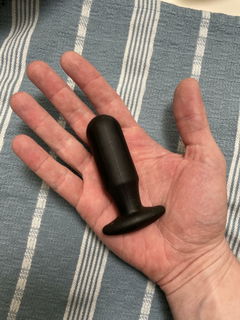
Power Output: Dual-channel stimulator compatible with up to 4 uni-polar accessories, 2 bi-polar accessories or 1 quadripolar accessory.
Battery: USB Rechargeable battery, up to 6 hours of use per charge, 3-hour charging time.
User-Updatable Firmware: Future-proof your Linx with firmware updates that can add new patterns, enhance features, or resolve bugs.
User Interface: OLED screen with tactile button interface and clear menu navigation.
Dimensions: 25mm x 68mm x 118mm (1" x 2.7" x 4.7")
Weight: 116g (4.1oz)
Ideal Uses: Solo play, partner play, or remote-controlled sessions. Suitable for advanced users seeking powerful stimulation.
Unlike the vast majority of e-stim devices that have an asymmetrical output waveform, Linx has a symmetrical bi-phasic waveform with zero net DC. This gives a "fuller" stimulation sensation due to the fact that the signal is driven in both a positive and negative direction as opposed to the traditional single direction of drive.
The red trace below shows the output waveform on channel 1 and the yellow shows channel 2. Both channels have a 560 ohm load and are at maximum intensity.
Each graticule represents 50V amplitude with a timebase of 2.5ms.

It is also important to note that the two channels are 180 degrees out of phase, i.e. interpolated. This is critical in order to ensure that the two outputs are isolated from one another. Dual channel stimulators that are not isolated in this way will have fluctuating and unpredictable intensity levels.
The ElectraStim Linx features user‑updatable firmware, so you can always stay up to date with the latest features and improvements. Updates can be installed directly through the ElectraStim Linx App or by using our ElectraStim Update Software on desktop. This ensures you can access new patterns, feature enhancements, and important fixes as soon as they’re released.
We don't currently have any updates available but you can get the update software now to be notified when a new update is available.
You MUST use Update Software V4.1 and above for Linx
Stimulation Safety
Stimulation should ONLY be applied below the waist and you should follow all safety procedures when using electrostimulation.
Learn more about Electro Safety
Phone Compatibility
To get the most out of Linx, your device should support Bluetooth Low Energy (BLE) 5.0 or higher. This provides the most reliable connection, improved responsiveness and the best overall performance for specific features such as long range or high-speed modes.
If you’re unsure which Bluetooth version your device uses, you can find this in your device settings (typically under About device), or by searching your model name online.

Take full control of your ElectraStim LINX stimulator directly from your smartphone using our new app. Adjust the intensity and control your stimulation using various modes with intuitive on-screen controls.

LINX makes long-distance electro play effortless with its secure remote control feature. Share your unique access code to let a partner (Dom) take full command of your stimulation from anywhere in the world, while you (the Sub) experience each pulse live. Stay connected and enjoy electro play no matter where you are.

LINX offers 11 Wave patterns and 12 Pulse patterns alongside our advanced motion modes for next-level control. Use Tilt mode to change stimulation intensity by moving your phone, or Flick mode to trigger intense pulses with a simple flicking gesture. Personalise every session for a fully interactive experience.

LINX lets you harness the power of sound for a more immersive electro experience. Use your device’s microphone to convert sound into stimulation, or upload audio files for perfectly timed, rhythmic stimulation.

Design your own electro experiences with LINX’s Playlist feature. Create unique “snippets” with adjustable parameters like rise, hold, fall, and rest times, then build a fully custom playlist by simply dropping in your snippets. There are endless possibilities for creativity and control.

Enjoy up to 6 hours of playtime on from a full charge. Built for modern USB-C charging with a recharge time of approximately 3 hours. A more environmentally-friendly way to have fun without the need for batteries.